

Since the last update, we receive often the following exception from our users log. I don't know exactly how to reproduce, but I know that when it happens, the user tries to click anywhere in the document and each time the exception is thrown. The users need to close and reopen the document to make it work again.
System.NullReferenceException: Object reference not set to an instance of an object. at Telerik.Windows.Documents.UI.DocumentPresenterBase.CaretPosition_PositionChanged(Object sender, EventArgs e) at Telerik.Windows.Documents.DocumentPosition.MoveToPosition(DocumentPosition newPosition) at Telerik.Windows.Documents.Selection.MouseSelectionHandler.UpdateSelectionAndCaretPosition() at Telerik.Windows.Documents.Selection.MouseSelectionHandler.RegisterDocumentMouseMove(Point position, SourceType source) at Telerik.Windows.Documents.UI.DocumentPresenterBase.HandleMouseMoveOnPosition(Point position, SourceType source) at Telerik.Windows.Documents.UI.DocumentPresenterBase.Owner_MouseMove(Object sender, MouseEventArgs e) at System.Windows.EventRoute.InvokeHandlersImpl(Object source, RoutedEventArgs args, Boolean reRaised) at System.Windows.UIElement.RaiseEventImpl(DependencyObject sender, RoutedEventArgs args) at System.Windows.Input.InputManager.ProcessStagingArea() at System.Windows.Input.MouseDevice.Synchronize() at System.Windows.Input.MouseDevice.PostProcessInput(Object sender, ProcessInputEventArgs e) at System.Windows.Input.InputManager.ProcessStagingArea() at System.Windows.Interop.HwndMouseInputProvider.ReportInput(IntPtr hwnd, InputMode mode, Int32 timestamp, RawMouseActions actions, Int32 x, Int32 y, Int32 wheel) at System.Windows.Interop.HwndMouseInputProvider.FilterMessage(IntPtr hwnd, WindowMessage msg, IntPtr wParam, IntPtr lParam, Boolean& handled) at System.Windows.Interop.HwndSource.InputFilterMessage(IntPtr hwnd, Int32 msg, IntPtr wParam, IntPtr lParam, Boolean& handled) at MS.Win32.HwndWrapper.WndProc(IntPtr hwnd, Int32 msg, IntPtr wParam, IntPtr lParam, Boolean& handled) at System.Windows.Threading.ExceptionWrapper.InternalRealCall(Delegate callback, Object args, Int32 numArgs) at System.Windows.Threading.ExceptionWrapper.TryCatchWhen(Object source, Delegate callback, Object args, Int32 numArgs, Delegate catchHandler)
We also had this case when we try programatically to move the caret (seems to be the same end result exception):
System.NullReferenceException: Object reference not set to an instance of an object.
at Telerik.Windows.Documents.UI.DocumentPresenterBase.CaretPosition_PositionChanged(Object sender, EventArgs e)
at Telerik.Windows.Documents.DocumentPosition.MoveToDocumentStart()
at Telerik.Windows.Documents.DocumentPosition.MoveToFirstPositionInDocument()

#.##0,00;-#.##0,00;;@ does not work in RadSpreadsheet. It should suppress visualizing of ) values.

Workaround: #.##0,00;-#.##0,00; ;@ works fine (there is ' ' [space] set for the zero values).


According to the PDF specification (Adobe® Portable Document Format Version 1.7):
Append a rectangle to the current path as a complete subpath, with lower-left corner (x, y) and dimensions width and height in user space.
The operation:
x y width height re
An invalid case:
0 - 595 -842 re
This leads to an exception thrown: System.NullReferenceException: 'Object reference not set to an instance of an object.'
The label of the field that allows you to set the ScreenTip in the Hyperlink dialog is not vertically centered to the associated textbox visual. This reproduces in the Windows11 theme.
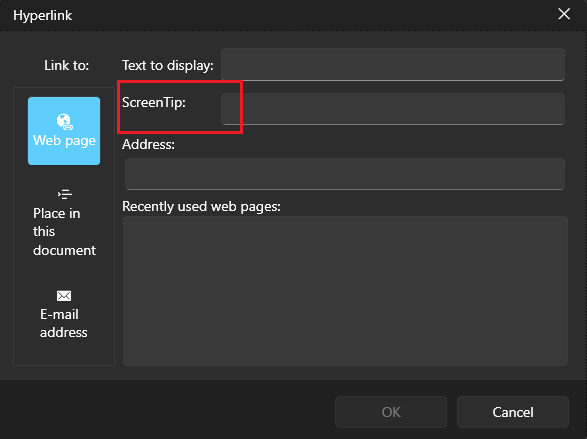
To work this around, get the TextBlock element in the Hyperlink dialog and set its VerticalAlignment property to Center.
private void RadSpreadsheet_Loaded(object sender, RoutedEventArgs e)
{
    var hyperlinkDialog = this.spreadsheet.ActiveWorksheetEditor.Dialogs.HyperlinkDialog as HyperlinkDialogContent;
    hyperlinkDialog.Loaded += HyperlinkDialog_Loaded;
}

private void HyperlinkDialog_Loaded(object sender, RoutedEventArgs e)
{
    var dialog = (HyperlinkDialogContent)sender;
    var screenTipLocalizedText = LocalizationManager.Manager.GetStringOverride("Spreadsheet_InsertHyperlinkDialog_ScreenTip");
    var screenTipTb = dialog.ChildrenOfType<TextBlock>().FirstOrDefault(x => x.Text == screenTipLocalizedText);
    if (screenTipTb != null)
    {
        screenTipTb.VerticalAlignment = VerticalAlignment.Center;
    }
}
A password is asked although Adobe opens the document without one when the document is encrypted with "Encryption of data using the RC4 or AES algorithms with a file encryption key length of 40 bits." - Version 1 (V 1) Revision 2 (R 2).
Similar cases (V1 R3 and V2 R3) are handled in the following item: PdfViewer: A password is asked although Adobe opens the document without one.
The issue reproduces only if the content control was locked before any text is entered (when the text placeholder is displayed).
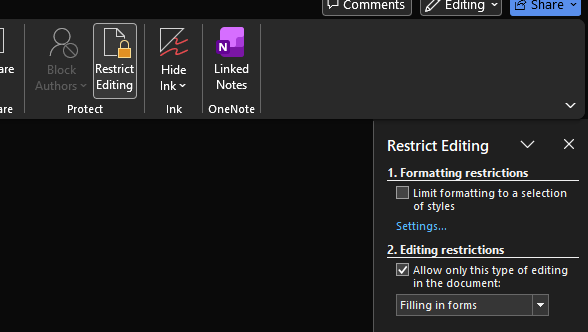
Add protection mode that allows to make the document readonly, but allow forms editing. In MS Word this can be enabled via the "Restrict Editing" menu. The option is called "Filling in forms" and protects the document, but leaves the Sdt elements (the forms) editable.
Remove the System.Net.Http package dependency.
Selecting a column with two or more merged cells, selects not only the selected column but the rest of columns that the merged cells are from. The behavior when working with rows is analogical.
Synchronize the font properties and make sure that the content control uses same font as the existing paragraph/span.
ArgumentException occurs when using the voice typing feature of Windows (started with the Windows Key + H key combo) to convert speech to text in RadRichTextBox.
Exception stacktrace:
System.ArgumentException: 'Requested distance is outside the content of the associated document.'PresentationFramework.dll!System.Windows.Documents.TextPointer.TextPointer(System.Windows.Documents.TextContainer textContainer, int offset, System.Windows.Documents.LogicalDirection direction)
  PresentationFramework.dll!System.Windows.Documents.TextContainer.CreatePointerAtOffset(int offset, System.Windows.Documents.LogicalDirection direction)
  PresentationFramework.dll!System.Windows.Documents.TextParentUndoUnit.Do()
  PresentationFramework.dll!MS.Internal.Documents.UndoManager.Redo(int count)
  PresentationFramework.dll!System.Windows.Documents.TextStore.RedoQuietly(int count)  PresentationFramework.dll!System.Windows.Documents.TextStore.SetFinalDocumentState(MS.Internal.Documents.UndoManager undoManager, System.Collections.Stack imeChangeStack, int appChangeCount, int imeSelectionAnchorOffset, int imeSelectionMovingOffset, int appSelectionAnchorOffset, int appSelectionMovingOffset)  PresentationFramework.dll!System.Windows.Documents.TextStore.HandleCompositionEvents(int previousUndoCount)  PresentationFramework.dll!System.Windows.Documents.TextStore.GrantLockWorker(MS.Win32.UnsafeNativeMethods.LockFlags flags)   PresentationFramework.dll!System.Windows.Documents.TextStore.RequestLock(MS.Win32.UnsafeNativeMethods.LockFlags flags, out int hrSession)